System.Collections Namespace
Whenever we work with collection of objects, we might find ourselves in need to iterate the collection. The best way to iterate through a collection is by implementing the Iterator pattern. (refer:Understanding and Implementing the Iterator Pattern in C# and C++[^]). C# provides a very clean construct of
foreach statement to iterate in a read only manner over a collection.
C# also provides us the possibility of using the same
foreach construct and all the enumeration techniques on our custom collection objects by implementing the IEnumerable interface. So let us see how we can implement IEnumerable interface with our custom collection classes.Using the code
Enumerating the Collection classes
Before starting the discussion let us see how we can use the Built-in classes and iterate over them. Lets start by looking into the
ArrayList class that implements IEnumerable and see how we can have read only iteration over that using foreach statement. // Let us first see how we can enumerate an object implementing IEnumerable
ArrayList list = new ArrayList();
list.Add("1");
list.Add(2);
list.Add("3");
list.Add('4');
foreach (object s in list)
{
Console.WriteLine(s);
}
Enumerating the Generic Collection classes
The
Arraylist class is a generalized class that let us keep a collection. We can also have a generic class in which we can provide the type along with the data. Iterating over generic collection classes is also possible because they implement IEnumerable<T> interface. Lets see how we can enumerate over a generic collection.// Let us first see how we can enumerate an object implementing IEnumerable<T>
List<string> listOfStrings = new List<string>();
listOfStrings.Add("one");
listOfStrings.Add("two");
listOfStrings.Add("three");
listOfStrings.Add("four");
foreach (string s in listOfStrings)
{
Console.WriteLine(s);
}
Now our objective is to have our own custom collection class and a generic collection class that should implement the
IEnumerable and IEnumerable<T> interface respectively to provide the possibility of enumerating over them.Understanding the yield keyword
Before jumping into the Implementation of these classes, we need to understand a very important keyword
yield which actually facilitate the enumeration over collection. yield statement is used while returning a value from a function.
A normal method call like the one shown below will return only the first value no matter how many times it is called.
static int SimpleReturn()
{
    return 1;
    return 2;
    return 3;
}

static void Main(string[] args)
{
    // Lets see how simeple return works
    Console.WriteLine(SimpleReturn());
    Console.WriteLine(SimpleReturn());
    Console.WriteLine(SimpleReturn());
    Console.WriteLine(SimpleReturn());
}
The reason for this is that the normal return statement does not preserve the state of the function while returning. i.e. every call to this function is a new call and it will return the first value only.
Where as if I replace the return keyword by yield return then the function will become capable of saving its state while returning the value. i.e. when the function is called second time, it will continue the processing from where is has returned in the previous call.
static IEnumerable<int> YieldReturn()
{
    yield return 1;
    yield return 2;
    yield return 3;
}
static void Main(string[] args)
{
    // Lets see how yield return works
    foreach (int i in YieldReturn())
    {
        Console.WriteLine(i);
    }
}
When we run the above code it will return 1,2 and then 3. The only catch while using the
yield return statement is that the function should return an IEnumerable and should be called from an iteration block i.e. foreach statement.Implementing IEnumerable in our custom Collection class
Now in our custom collection classes, if we define a function that will iterate over all the elements in the collection and return then using the
yield keyword, we will be able to get hold of all the elements in the the collection.
So let us define our own
MyArrayList class and implement IEnumerable interface, which will force us to implement the GetEnumerator function. This function will iterate over the collection and do ayield return on all the elements.class MyArrayList : IEnumerable
{
object[] m_Items = null;
int freeIndex = 0;
public MyArrayList()
{
// For the sake of simplicity lets keep them as arrays
// ideally it should be link list
m_Items = new object[100];
}
public void Add(object item)
{
// Let us only worry about adding the item
m_Items[freeIndex] = item;
freeIndex++;
}
// IEnumerable Member
public IEnumerator GetEnumerator()
{
foreach (object o in m_Items)
{
// Lets check for end of list (its bad code since we used arrays)
if(o == null)
{
break;
}
// Return the current element and then on next function call
// resume from next element rather than starting all over again;
yield return o;
}
}
}
This class will now let us enumerate all the elements using a
foreach stemement.static void Main(string[] args)
{
//Let us now go ahead and use our custom MyArrayList with IEnumerable implemented
MyArrayList myList = new MyArrayList();
myList.Add("1");
myList.Add(2);
myList.Add("3");
myList.Add('4');
foreach (object s in myList)
{
Console.WriteLine(s);
}
}
Note: This class is neither complete not a very good implementation. The only purpose of the sample implementation is to demonstrate the implementation of
IEnumerable interface.Implementing IEnumerable<T> in our custom Generic Collection class
Let us now take this approach a little further and define a generic collection class capable of being enumerated. To do this we need to implement
IEnumerable<T> interface. class MyList<T> : IEnumerable<T>
{
T[] m_Items = null;
int freeIndex = 0;
public MyList()
{
// For the sake of simplicity lets keep them as arrays
// ideally it should be link list
m_Items = new T[100];
}
public void Add(T item)
{
// Let us only worry about adding the item
m_Items[freeIndex] = item;
freeIndex++;
}
#region IEnumerable<T> Members
public IEnumerator<T> GetEnumerator()
{
foreach (T t in m_Items)
{
// Lets check for end of list (its bad code since we used arrays)
if (t == null) // this wont work is T is not a nullable type
{
break;
}
// Return the current element and then on next function call
// resume from next element rather than starting all over again;
yield return t;
}
}
#endregion
#region IEnumerable Members
System.Collections.IEnumerator System.Collections.IEnumerable.GetEnumerator()
{
// Lets call the generic version here
return this.GetEnumerator();
}
#endregion
}
This class will now let us enumrate all the elements using a
foreach stemement.static void Main(string[] args)
{
// Let us first see how we can enumerate an custom MyList<t> class implementing IEnumerable<T>
MyList<string> myListOfStrings = new MyList<string>();
myListOfStrings.Add("one");
myListOfStrings.Add("two");
myListOfStrings.Add("three");
myListOfStrings.Add("four");
foreach (string s in myListOfStrings)
{
Console.WriteLine(s);
}
}
</t>
So now we have a collection class and a generic collectio class that implement
https://www.youtube.com/watch?v=jd3yUjGc9M0
IEnumerable and IEnumerable<T> respectively. Althogh These class is neither complete not a very good implementation but they do serve the purpose of the article i.e. to demonstrate the implementation of IEnumerable interface.https://www.youtube.com/watch?v=jd3yUjGc9M0
*********************************************************************************


******************************
Let me make a few statements as my background for the concept.
- The
IEnumerable<T>interface is a generic interface that provides an abstraction for looping over elements. In addition to providingforeachsupport, it allows you to use extension methods in theSystem.Linqnamespace. foreachloop is used on a collection that implements theIEnumerableinterface.foreachloop returns each element of a collection in the order it is called in the enumeration.foreachprovides in order element access from a collection; it does not accept index and provides access to elements, so eliminates errors caused by incorrect index handling.IEnumerableis an interface enforcing a rule that we need to implement theGetEnumeratormethod.GetEnumeratormethod returns anIEnumeratorinterface.
Following is the signature for the
GetEnumerator method.public IEnumerator GetEnumerator(void)
Now we have to implement the
IEnumerator interface with the IEnumerable interface in order to accept a return value from the GetEnumerator method.
The
IEnumerator interface enforces rules that we need to implement as follows:MoveNextmethod [public bool MoveNext(void)]- Increment collection counter by one
- If end of collection has been reached, it will return
falseelse returntrue Resetmethod [pubic void Reset(void)]- Resets the collection index to its initial value of
-1 Currentmethod [public object Current(void)]- Return the current index object from collection
Using the Code
- Start Microsoft Visual Studio
- Open File->New->Project->Console Application
- Give some nice name to console application
- Open Project->AddClass
- Give name
Employeeto itpublic class Employee { private int employee_Id; private string employee_Name; public Employee(int employee_Id, string employee_Name) { this.employee_Id = employee_Id; this.employee_Name = employee_Name; } public int Employee_Id { get { return employee_Id; } set { employee_Id=value; } } public string Employee_Name { get { return employee_Name; } set { employee_Name=value; } } }
Employeeclass is a single unit type in theforeachloop.- We have exposed two properties
Employee_IdandEmployee_Name. - Now let’s start creating our collection that would be applied on the
Foreachloop. - Let’s start following statements that we had stated in the background.
- Create class
Employeesand implement theIEnumerableandIEnumeratorinterfaces. - We will also create an
Employeeclass array collection and initialize in the constructor by adding anEmployeeobject into the collection of theEmployeearray.
public class Employees : IEnumerable,IEnumerator
{
    private Employee[] employeeList;
    private int position = -1;

    public Employees()
    {
        employeeList = new Employee[4]{
                    new Employee(1,"Amey"),
                    new Employee(2,"Pushkar"),
                    new Employee(3,"Raju"),
                    new Employee(5,"Vijay")
        };
    }

    public object Current
    {
        get
        {
            try
            {
                return employeeList[position];
            }
            catch (IndexOutOfRangeException)
            {
                throw new InvalidOperationException();
            }
        }
    }

    public bool MoveNext()
    {
        position++;
        return (position < employeeList.Length);
    }

    public void Reset()
    {
        position = 0;
    }

    public IEnumerator GetEnumerator()
    {
        return (IEnumerator)this;
    }
}
Program class that contains the Main method.foreach loop on the Employees class that implements the interfaces IEnumerable and IEnumerator. The Employees class contains an array collection of the Employee class. Main method.static void Main(string[] args)
{
var employees = new Employees();
foreach (Employee employee in employees)
{
Console.WriteLine("Employee Id:- "+employee.Employee_Id.ToString()
+"\t\t"
+"Employee Name:- "+employee.Employee_Name);
}
Console.ReadLine();
}
You will observe the following output:
Employee Id: - 1     Employee Name: - Amey
Employee Id: - 2     Employee Name: - Pushkar
Employee Id: - 3     Employee Name: - Raju
Employee Id: - 5     Employee Name: - Vijay
Code optimization
Yieldkeyword in C#.
In C#, it is not strictly necessary for a collection class to implement Foreachis not type safe.
As our
IEnumerable and IEnumerator in order to be compatible with foreach.As long as the class has the required
GetEnumerator, MoveNext, Reset, and Current members, it will work with foreach.Or we can say that:
As long as the class has the required
GetEnumerator() function that returns an instance that implements either an IEnumerator or IEnumerator<T> interface that enforces to use members MoveNext, Reset, and Current.When you use the
yield keyword in a statement, you indicate that the method, operator, or get accessor in which it appears is an iterator, i.e., Yield keyword appears in an iterator block.When a
yield return statement is reached in the iterator method, the current state of the code is retain.An expression that evaluates the value to enumerator [i.e.,
Employee class object] is returned and control moves to the caller.After executing the caller block, control again moves back to the iterator method and restarts from the retain state.
Based on the above statement, we can optimize our
Employees class as below:public class Employees : IEnumerable
{
private Employee[] employeeList;
private int position = -1;
public Employees()
{
employeeList = new Employee[4]{
new Employee(1,"Amey"),
new Employee(2,"Pushkar"),
new Employee(3,"Raju"),
new Employee(5,"Vijay")
};
}
public IEnumerator GetEnumerator()
{
foreach(Employee employee in employeeList)
yield return employee;
}
}
foreach statement in main method can be written as:Foreach(int employee… or Foreach (string employee )
So it is not type safe, right? To make it type safe, let’s declare it as var which gets assigned its type during runtime.So our
main function looks like below:static void Main(string[] args)
{
Employees employees = new Employees();
foreach (var employee in employees)
{
Console.WriteLine("Employee Id:- " +
(employee as Employee).Employee_Id.ToString()
+ "\t\t"
+ "Employee Name:- " +
(employee as Employee).Employee_Name);
}
Console.ReadLine();
}
Notes
- The
foreachconstruct comes from C# 1.0, before generics existed. It worked with untyped collections such asArrayListorIEnumerable. Therefore, theIEnumerator.Currentproperty that gets assigned to the loop variable would usually be of typeobject. - Iterator Pattern falls into the behavioral category. Iterator pattern helps developers to expose a collection element access in a controlled manner. An iterator allows sequential access of elements without exposing the inside code. It protects a collection from errors like error caused by incorrect index handling. When a developer uses a
foreachloop he is using the Iterator Pattern knowing or unknowingly.
public object Current
{
    get
    {
        try
        {
            return (Employee)employeeList[position];
        }
        catch (IndexOutOfRangeException)
        {
            throw new InvalidOperationException();
        }
    }
}
***********************************************************************************************************
When to use IEnumerable, ICollection, IList and List
I think that the question when to use IEnumerable, ICollection, IList or List is a common one that hasn’t often answered in an easy way. I not only want to do this within this article, but I also want to give you some further information to understand the things more deeply.
If you get the understanding for the principle, you’ll be automatically really confident when you have to do this decision for the next time.
If you only want to know when to use which type, scroll down and have a look at the table providing the scenarios and the relevant types. Of course I strongly recommend to read through the entire article to get a deeper understanding tough.
Let’s first take a look at the individual types and more importantly its members. It’s generally a good idea to have a look at the types in question if you want to decide which type you should use in a specific situation in your code.
Let’s first take a look at the individual types and more importantly its members. It’s generally a good idea to have a look at the types in question if you want to decide which type you should use in a specific situation in your code.
IEnumerable
First of all it is important to understand, that there are two different interfaces defined in the .NET base class library. There is a non-generic IEnumerable interface and there is a generic type-safe IEnumerable<T> interface.
The IEnumerable interface is located in the System.Collections namespace and contains only a single method definition. The interface definition looks like this:
public interface IEnumerable{ IEnumerator GetEnumerator();} |
The GetEnumerator method must return an instance of an object of a class which implements the IEnumerator interface. This time we won’t have a look at the definition of the IEnumerator interface, but if you are interested, please visit the official msdn documentation.
It is important to know that the C# language foreach keyword works with all types that implement the IEnumerable interface. Only in C# it also works with things that don’t explicitly implement IEnumerable or IEnumerable<T>. I believe you have been using the foreach keyword many times and without worrying about the reason why and how it worked with that type.
IEnumerable<T>
Now let’s take a look at the definition of the generic and type-safe version calledIEnumerable<T> which is located in the System.Collections.Generic namespace:
public interface IEnumerable<out T> : IEnumerable{ IEnumerator<T> GetEnumerator();} |
As you can see the IEnumerable<T> interface inherits from the IEnumerable interface. Therefore a type which implements IEnumerable<T> has also to implement the members of IEnumerable.
IEnumerable<T> defines a single method GetEnumerator which returns an instance of an object that implements the IEnumerator<T> interface. We won’t have a look at this interface at this time. Please take a look at the official msdn documentation if you would like to get some more information.
ICollection
As you could imagine there are also two versions of ICollection which are System.Collections.ICollection and the generic version System.Collections.Generic.ICollection<T>.
Let’s take a look at the definition of the ICollection interface type:
public interface ICollection : IEnumerable{ int Count { get; } bool IsSynchronized { get; } Object SyncRoot { get; } void CopyTo(Array array, int index);} |
ICollection inherits from IEnumerable. Therefore you have all members from theIEnumerable interface implemented in all classes that implement the ICollection interface.
This time I won’t go much into details of the defined methods and properties. I just want to let you know about the official description from the msdn documentation:
Defines size, enumerators, and synchronization methods for all nongeneric collections.
ICollection<T>
When we look at the generic version of ICollection, you’ll recognize that it does not look exactly the same as the non-generic equivalent:
public interface ICollection<T> : IEnumerable<T>, IEnumerable{ int Count { get; } bool IsReadOnly { get; } void Add(T item); void Clear(); bool Contains(T item); void CopyTo(T[] array, int arrayIndex); bool Remove(T item);} |
The official msdn documentation looks like this:
Defines methods to manipulate generic collections.
In fact we have some more methods to add, remove and clear a collection. The way synchronization has implemented differs also. I believe that this happened because the generic version of this interface was introduced with .NET 2.0 whereas the non-generic version was already introduced in .NET 1.1.
IList
The IList interface has of course a non-generic and a generic version. We start with looking at the non-generic IList interface:
public interface IList : ICollection, IEnumerable{ bool IsFixedSize { get; } bool IsReadOnly { get; } Object this[int index] { get; set; } int Add(Object value); void Clear(); bool Contains(Object value); int IndexOf(Object value); void Insert(int index, Object value); void Remove(Object value); void RemoveAt(int index);} |
IList implements ICollection and IEnumerable. In addition it provides method definitions for adding and removing elements and to clear the collection. It also provides methods for handling the positioning of the elements within the collection. It also provides an object indexer to allow the user to access the collection with square brackets like:
myList[elementIndex] |
IList<T>
Now let’s take a look at the generic version of IList:
public interface IList<T> : ICollection<T>, IEnumerable<T>, IEnumerable{ T this[int index] { get; set; } int IndexOf(T item); void Insert(int index, T item); void RemoveAt(int index);} |
As we mentioned before when discussing the ICollection<T> interface, there are some more methods defined in the ICollection<T> interface than in the ICollection interface. Therefore is the member list of the IList<T> interface a bit shorter than the non-generic equivalent. We only have some new methods for accessing a collection with specific positioning.
Conclusion
Take a look at the following graphic. Not every interface member is displayed, but it should be enough to give you an overview about all types we discussed.
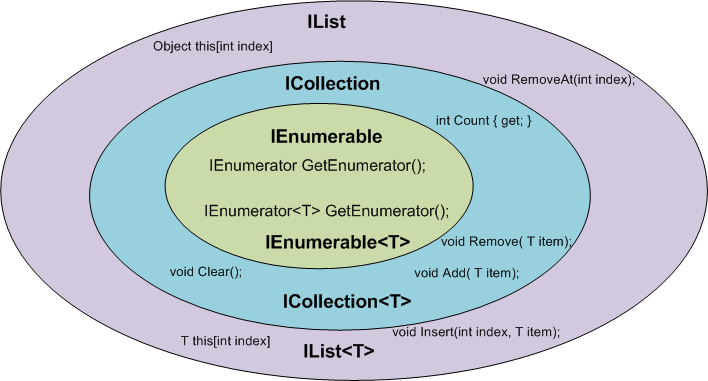
Which type should you depend on?
Now that we have looked at all of the interfaces in question, we are ready to decide which interface we should depend on in which situation. Generally it’s a great idea to only depend upon things we really need. I am going to show you how this decision can be made very easily and what you can expect to gain if you do so.
If you use a more narrow interface type such as IEnumerable instead of IList, you protect your code against breaking changes. If you use IEnumerable, the caller of you method can provide any object which implements the IEnumerable interface. These are nearly all collection types of the base class library and many custom defined types in addition. The caller code can be changed in the future and your code won’t break that easily as it would if you had used ICollection or even worse IList.
If you use a wider interface type such as IList, you are more in danger of breaking code changes. If someone wants to call your method with a custom defined object which only implements IEnumerable it simply won’t work and result in a compilation error.
Generally you should always use that type that provides a contract for only the methods you really use.
The following table gives you an overview of how you could decide which type you should depend on.
| Interface | Scenario |
| IEnumerable, IEnumerable<T> | The only thing you want is to iterate over the elements in a collection. You only need read-only access to that collection. |
| ICollection, ICollection<T> | You want to modify the collection or you care about its size. |
| IList, IList<T> | You want to modify the collection and you care about the ordering and / or positioning of the elements in the collection. |
| List, List<T> | Since in object oriented design you want to depend on abstractions instead of implementations, you should never have a member of your own implementations with the concrete type List/List. |
***********************************************************************************************************
http://support.microsoft.com/kb/322022This step-by-step article demonstrates how to use the IEnumerable and the IEnumerator interfaces to create a class that you can use in a foreach statement. IEnumerable and IEnumerator are frequently used together. Although these interfaces are similar (and have similar names), they have different purposes.
IEnumerator interface
The IEnumerator interface provides iterative capability for a collection that is internal to a class. IEnumerator requires that you implement three methods:- The MoveNext method, which increments the collection index by 1 and returns a bool that indicates whether the end of the collection has been reached.
- The Reset method, which resets the collection index to its initial value of -1. This invalidates the enumerator.
- The Current method, which returns the current object at [position].
      public bool MoveNext()
      {
         position++;
         return (position < carlist.Length);
      }

      public void Reset()
      {position = 0;}

      public object Current
      {
         get { return carlist[position];}
      }
IEnumerable interface
The IEnumerable interface provides support for the foreach iteration. IEnumerable requires that you implement theGetEnumerator method. public IEnumerator GetEnumerator()
{
return (IEnumerator)this;
}
When to use which interface
Initially, you may find it confusing to use these interfaces. The IEnumerator interface provides iteration over a collection-type object in a class. The IEnumerable interface permits enumeration by using a foreach loop. However, the GetEmuneratormethod of the IEnumerable interface returns an IEnumerator interface. Therefore, to implement IEnumerable, you must also implement IEnumerator. If you do not implement IEnumerator, you cannot cast the return value from the GetEnumeratormethod of IEnumerable to the IEnumerator interface.In summary, the use of IEnumerable requires that the class implement IEnumerator. If you want to provide support forforeach, implement both interfaces.
Step by step example
The following example demonstrates how to use these interfaces. In this example, the IEnumerator and the IEnumerableinterfaces are used in a class named cars. The cars class has an internal array of car objects. Client applications can enumerate through this internal array by using a foreach construct because of the implementation of these two interfaces.- Follow these steps to create a new Console Application project in Visual C#:
- Start Microsoft Visual Studio .NET or Microsoft Visual Studio 2005.
- On the File menu, point to New, and then click Project.
- Click Visual C# Projectsunder Project Types, and then click Console Application under Templates.
Note In Visual Studio 2005, click Visual C# under Project Types. - In the Name box, type ConsoleEnum.
- Rename Class1.cs to host.cs, and then replace the code in host.cs with the following code:
using System; namespace ConsoleEnum { class host { [STAThread] static void Main(string[] args) { cars C = new cars(); Console.WriteLine("\nInternal Collection (Unsorted - IEnumerable,Enumerator)\n"); foreach(car c in C) Console.WriteLine(c.Make + "\t\t" + c.Year); Console.ReadLine(); } } } - On the Project menu, click Add Class, and then type car in the Name box.
- Replace the code in car.cs with the following code:
using System; using System.Collections; namespace ConsoleEnum { public class car { private int year; private string make; public car(string Make,int Year) { make=Make; year=Year; } public int Year { get {return year;} set {year=value;} } public string Make { get {return make;} set {make=value;} } }//end class }//end namespace - On the Project menu, click Add Class to add another class to the project, and then type cars in the Name box.
- Replace the code in cars.cs with the following code:
using System; using System.Collections; namespace ConsoleEnum { public class cars : IEnumerator,IEnumerable { private car[] carlist; int position = -1; //Create internal array in constructor. public cars() { carlist= new car[6] { new car("Ford",1992), new car("Fiat",1988), new car("Buick",1932), new car("Ford",1932), new car("Dodge",1999), new car("Honda",1977) }; } //IEnumerator and IEnumerable require these methods. public IEnumerator GetEnumerator() { return (IEnumerator)this; } //IEnumerator public bool MoveNext() { position++; return (position < carlist.Length); } //IEnumerable public void Reset() {position = 0;} //IEnumerable public object Current { get { return carlist[position];} } } } - Run the project. Notice that the following output appears in the Console window:
Ford            1992
Fiat            1988
Buick           1932
Ford            1932
Dodge           1999
Honda           1977
Best practices
The example in this article is kept as simple as possible to better explain the use of these interfaces. To make the code more robust and to make sure that the code uses the current best practice guidelines, modify the code as follows:- Implement IEnumerator in a nested class so that you can create multiple enumerators.
- Provide exception handling for the Current method of IEnumerator. If the contents of the collection change, the reset method is called. As a result, the current enumerator is invalidated, and you receive an IndexOutOfRangeException exception. Other circumstances may also cause this exception. Therefore, implement a Try...Catch block to catch this exception and to raise an InvalidOperationException exception.
using System;
using System.Collections;
namespace ConsoleEnum
{
  public class cars : IEnumerable
  {
    private car[] carlist;

    //Create internal array in constructor.
    public cars()
    {
      carlist= new car[6]
    {
      new car("Ford",1992),
      new car("Fiat",1988),
      new car("Buick",1932),
      new car("Ford",1932),
      new car("Dodge",1999),
      new car("Honda",1977)
    };
    }

        //private enumerator class
        private class  MyEnumerator:IEnumerator
        {
          public car[] carlist;
          int position = -1;

        //constructor
        public MyEnumerator(car[] list)
        {
          carlist=list;
        }
        private IEnumerator getEnumerator()
        {
          return (IEnumerator)this;
        }


        //IEnumerator
        public bool MoveNext()
        {
          position++;
          return (position < carlist.Length);
        }

        //IEnumerator
        public void Reset()
        {position = -1;}

        //IEnumerator
        public object Current
        {
          get
          {
            try
            {
              return carlist[position];
            }

            catch (IndexOutOfRangeException)
            {
              throw new InvalidOperationException();
            }
          }
        }
      }  //end nested class
    public IEnumerator GetEnumerator()
    {
      return new MyEnumerator(carlist);
    }
  }
}


